


કન્ટેન્ટ પર જાઓ
JaapDaily JaapDaily

ફીચર્સ

Jaap Dailyમાં બધું

એક counter. ઘણી કાળજી.

  • 74 naam · 39 mantra
  • app માં 20 ભાષાઓ
  • iPhone · Android · Apple Watch
  • મફત, દરેક feature
  • કોઈ ads નહીં, ક્યારેય નહીં
અથવા અહીં જ, હમણાં જ જપ કરો →

ગણતરી

દરેક tap, કાળજીથી ગણેલો.

Bead ring

દરેક tap સાથે pulse થતી 108-bead ring. દરેક bead sequenceમાં light થાય છે. Daily અને lifetime totals ઉપર દેખાય છે; તમારી mala count centerમાં રહે છે. Ring spinner કરતાં વધારે સીધી visual metaphor છે — તમે હાથમાં પકડો તે જ આકાર.

ખસેડી શકાય તેવી counter ringનવું

Counterને તમારું બનાવો. Settings → Counterમાં Drag mode on કરો અને bead ringને screenના કોઈપણ corner, edge અથવા અનુકૂળ જગ્યાએ drag કરો — એક હાથથી jap કરવા અથવા devotional artwork પરથી ring હટાવવા માટે સરસ. Ring automatically screen edgesની અંદર રહે છે. App ખોલો ત્યારે તમારી position save અને restore થાય છે.

Settings → Counter: drag enable કરવા "Drag mode" toggle; ringને ક્યારે પણ re-centre કરવા "Reset position". Anushthan modeમાં ઉપલબ્ધ નથી — dual-counter layout screenના બંને halves વાપરે છે.


Floating naam text

દરેક tap સાથે naam script-correct fontમાં ઉપર તરતું જાય છે. Preset color paletteમાંથી પસંદ કરો અથવા કોઈપણ HSV value પસંદ કરો. Optionally traditional Devanagari styleમાં તેને ॥ X ॥ dandas સાથે બંધ કરો.

Volume buttonsનવું

દરેક jap count કરવા Volume Up દબાવો. છેલ્લું undo કરવા Volume Down દબાવો — એટલે તમે screen જોયા વગર, આંખો બંધ કરીને jap કરી શકો છો. app ખુલ્લી અને screen on રાખો (Keep Screen Awake ચાલુ કરો જેથી screen ઝાંખી ન થાય); app background માં જાય ત્યારે counting અટકી જાય છે. iPhone અને Android બંને પર ઉપલબ્ધ; Settings → Countingમાં toggle on કરો.

JaapDaily દરેક system volume level પર count કરે છે, volume maximum અથવા minimum પર હોય ત્યારે પણ. ઘણા apps extremes પર presses register કરવાનું બંધ કરે છે. App backgroundમાં જાય ત્યારે feature auto-suspend થાય છે, એટલે app બહાર તમારા regular media controls અસરગ્રસ્ત નથી થતા.

તમારી offline practice log કરો

ઘણા ભક્તો screen tap કરવાને બદલે finger tally counter, traditional mala beads અથવા mental countથી ગણતા હોય છે. JaapDaily બંનેને માન આપે છે. Session પછી app ખોલો અને count ઉમેરો — તમારો daily total, lifetime total, mala completions અને streak બધું એમ update થાય છે જેમ તમે દરેક jap tap કર્યો હોય. History tabમાંથી 30 દિવસ સુધીના past sessions પણ backfill કરી શકો છો; જો ગઈકાલે log કરવાનું ભૂલી ગયા હો, તો તમારો streak automatically repair થાય છે.

Anushthan dual-counter mode

Naam અને mantraને independent mala sizes સાથે side-by-side track કરો. દરેકનો પોતાનો bell વાગે છે. Interface બે ભાગમાં split થાય છે — top zone Naam માટે, bottom zone Mantra માટે. History દરેકને અલગથી record કરે છે.

Focus અને personalise

બસ તમે અને તમારી ગણતરી.

Focus mode

Screen awake રાખીને full-screen wallpaper view. પાંચ included wallpapers — Radha Krishna, Ram, Shiv, Hanuman, Krishna — સાથે તમારી photosમાંથી એક custom, અને web પર download કરવા વધુ. Count કરવા ક્યાંય પણ tap કરો. Exit કરવા pinch out કરો. Status bar hidden. ફક્ત તમે અને count.

Themes

છ accent colors, light અને dark mode, પાંચ included wallpapers.

Notifications, તમારી રીતે

તમે પસંદ કરો તે સમયે daily reminder. Milestone celebrations. સંપૂર્ણપણે toggleable.

પ્રગતિ

તમારી સાધનાને વધતી જુઓ.

Insights

Today / Week / Month / All views સાથે daily bar chart. દિવસનો શ્રેષ્ઠ સમય. ગયા મહિના સામે momentum. Projected goal date. Current streak, longest streak અને total malas completed માટે stat cards. Chart ને Naam કે Mantra પર સ્વિચ કરો અને જુઓ કે તમે સૌથી વધુ કયું જપો છો — ટોચ પર leader card તેના હિસ્સા સાથે, નીચે પછીના ચાર, અને વધુ હોય તો આખી યાદી.

History

દરેક session date પ્રમાણે. Calendar view. Naam દ્વારા search અને filter. તમારો સંપૂર્ણ practice log, હંમેશા તમારા device પર.

Goals અને streaks

Daily અને lifetime jap goal set કરો. તમે daily goal પૂરો કરો તે દરેક દિવસે streak count થાય છે. Math calendar-correct છે: spring-forward અને timezone changes streak તોડતા નથી. (આ V1માં અમે fix કરેલો સાચો bug છે — ઘણા japa appsમાં હજુ પણ છે.)

Naam અને પાઠ

તમારી પરંપરા, તમારી લિપિમાં.

Sangrah — Chalisa અને Aartiનવું

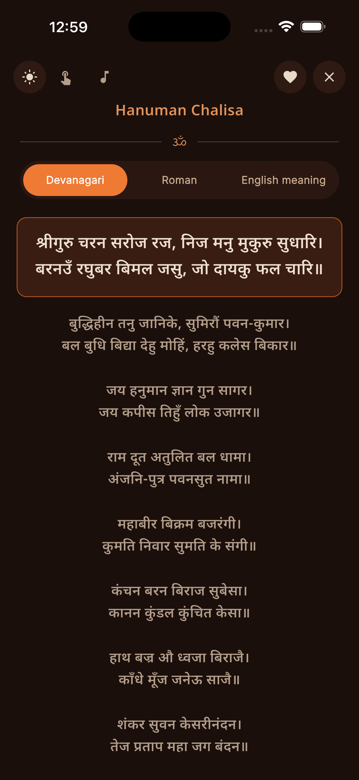
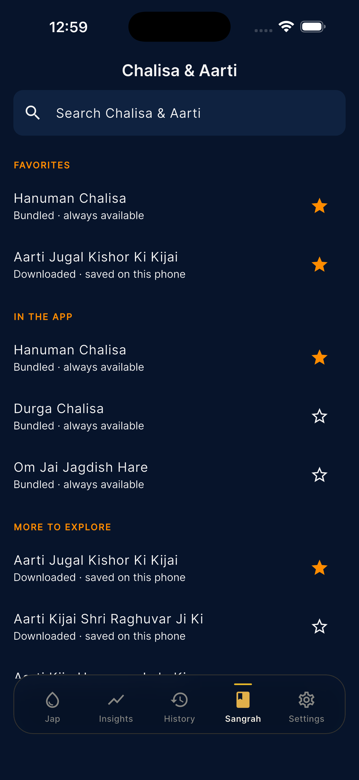
Chalisa અને Aarti texts ની સંપૂર્ણ library: 51 Chalisa અને 63 Aarti, કુલ 114. Hanuman Chalisa, Durga Chalisa, અને Om Jai Jagdish Hare app માં bundled છે અને હંમેશા offline available છે; બાકીના બધા on demand download થાય છે અને તમે દૂર ન કરો ત્યાં સુધી તમારા device પર cached રહે છે. દરેક line ને તમારી પોતાની speed એ tap કરીને આગળ વધો, Devanagari, Roman transliteration, અને English meaning વચ્ચે switch કરો, અને Aarti માટે gentle background music on કરો, mute toggle સાથે. Favorite entries એ જ રીતે sync થાય છે જે રીતે તમારી Naam અને Mantra favorites પહેલેથી થાય છે.

સાઇટ પર ચાલીસા વાંચો →

Sangrah reader માં ખૂલેલી Hanuman Chalisa — Devanagari text માં શરૂઆતનો doha highlighted, સાથે Roman transliteration અને English meaning ના tabs

74 naams અને 39 mantras

20 regional traditionsમાં 74 naams, app language મુજબ regional-first sorted. Vaishnav, Shaiva, Shakta, Universal અને Gujarati traditionsમાં 39 mantras, full transliteration અને Devanagari/Sanskrit/Gujarati originals સાથે. તમારું પોતાનું naam ઉમેરો — તમે જેમ લખો તેમ જ store થાય છે. તમે ઉમેરેલા naam ગમે ત્યારે કાઢી શકાય છે, અને જે built-in naam તમે જપતા નથી તેને છુપાવી શકાય છે — છુપાવવું ગમે ત્યારે પાછું વાળી શકાય છે, catalogueમાંથી કશું જતું નથી.

VaishnavShaivaShaktaUniversalGujarati

20 ભાષાઓ

English, Hindi, Gujarati, Tamil, Telugu, Kannada, Marathi, Bengali, Punjabi, Malayalam, Odia, Assamese, Urdu, Sanskrit (transliterated), Japanese, Russian, Spanish, French, German, Indonesian. Naam text પોતે ક્યારેય translate થતું નથી — ફક્ત app interface.

Devices અને sync

તમારા કાંડા પર, home screen પર, દરેક device પર.

Apple Watch

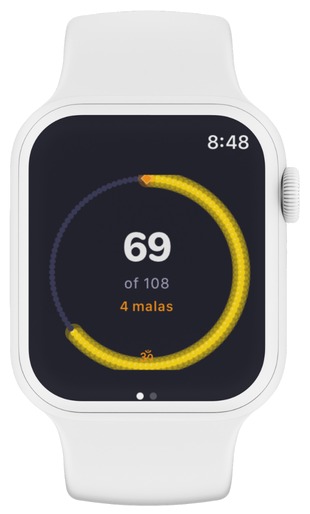
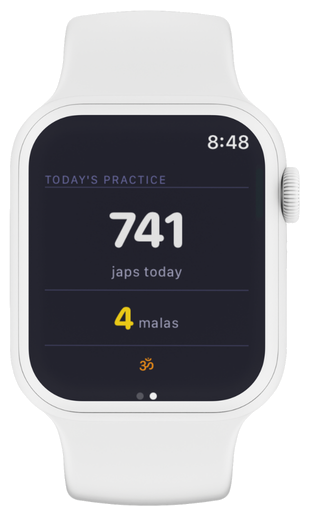
Standalone watchOS app, remote control નહીં. Watch face પર bead ring. Screen tap કરો, Digital Crown twist કરો, અથવા complication પર નજર કરો. તમારો phone બીજા roomમાં હોય ત્યારે પણ watch count કરે છે. Reconnect થાય ત્યારે પાછું sync થાય છે.

Android watches માટે Wear OS companion app આયોજિત છે — હાલ પૂરતું, watch app માત્ર Apple Watch છે.

Apple Watch પર Jaap Daily — 108માંથી 69 બતાવતી bead ring, 4 malas Apple Watch પર Jaap Daily — Today's Practiceમાં 741 japs અને 4 malas બતાવતું

Home screen widgets

iOS small (2×2) અને medium (4×2), Android small અને medium. આજની count, streak, naam અને goal progress એક નજરમાં.

Cloud sync અને optional sign-inનવું

તમારી practice, દરેક device પર. Phone number, email, Google અથવા Appleથી એકવાર sign in કરો — તમારા sessions, streaks, custom naams અને settings Firebase મારફતે automatically બધા devicesમાં sync થાય છે. Sign-in opt-in છે અને હંમેશા રહેશે; સંપૂર્ણ app account વગર પણ ચાલે છે. Sign in ન કરતા users માટે બધું પહેલાંની જેમ on-device રહે છે.

iCloud અને Google Drive backup

Device-level backup, cloud syncથી અલગ અને એટલું જ optional. iPhone પર iCloud backup અથવા Android પર Google Drive backup enable કરો અને તમારી practice data તમારા phoneના પોતાના backup સાથે રહે — નવા device પર move કરો ત્યારે restore થાય. તે તમારા iCloud અથવા Drive storageમાં રહે છે, અમારા serversની બહાર અને તમારા controlમાં; storage settingsમાંથી ક્યારે પણ remove કરો.

Chrome extension

Computer પર browser toolbar માંથી count કરો: તેર naams સાથે 108-bead mala, popup બંધ હોય ત્યારે પણ count કરતો shortcut, અને માત્ર એક permission. એ પોતાનો count અલગ રાખે છે, અને મોટી screen જોઈએ ત્યારે round ને web counter પર મોકલી દે છે.

Chrome extension વિશે →

જાપ કરો. મનન કરો. સ્મરણ કરો. નિખારો.

દરેક feature. મફત. કોઈ ads નહીં, ક્યારેય નહીં.

હવે iPhone, Android અને Apple Watch પર — Wear OS ટૂંક સમયમાં.

અથવા અહીં જ, હમણાં જ જપ કરો →

એપ મેળવો